
Sometime with your pipeline, application or any automation you may need to connect and authenticate with GitHub. For this you want to be secure, safe and not use a users details. This is why you would use a GitHub App instead, which is like a service account for authentication. I will guide you through how to create and generate the correct tokens to authenticate with the GitHub app for your automation.
First you will need to create your GitHub App, which they do have a very clean guide on how to do that here https://docs.github.com/en/developers/apps/building-github-apps/creating-a-github-app
You many want to set your permissions now for what repositories the app will have access to, even just for a test repository for an example.
Once you app is created you can generate and download the app’s Private Key.
https://docs.github.com/en/developers/apps/building-github-apps/authenticating-with-github-apps#generating-a-private-key
This will be used as your authentication to generate the token used later when doing your git commands.
This is where we get into the code, which we are going to used Bash, to generate a JWT. Our end goal is to have a Installation Token, which we can use to authenticate for git commands, but to do that we need to convert the Private Key into a valid JWT token.
To do this I used an example from @carestad called ‘github-app-jwt.sh’
We require for this the Private Key and the GitHub App ID, which you can get the ID from going to your app in GitHub.
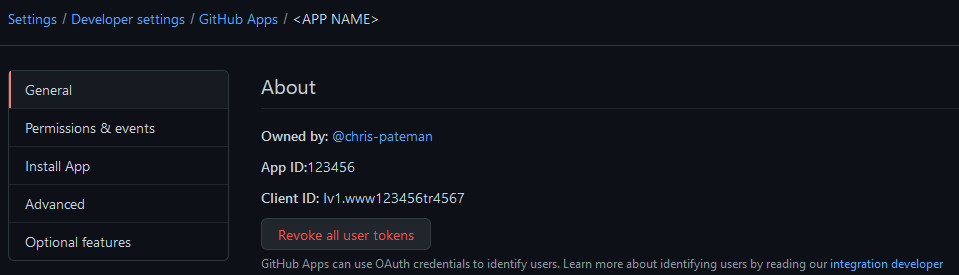
First we will set our GitHub App ID as a variable and then the Private Key path, which we then read the content into another variable.
privateKeyFilePath="./privateKeys/my-app.private-key.pem"
app_id="123456"
private_key=$(cat $privateKeyFilePath)
From there we can use the example from above to general the JWT.
# Shared content to use as template
header='{
    "alg": "RS256",
    "typ": "JWT"
}'
payload_template='{}'

build_payload() {
    jq -c \
    --arg iat_str "$(date +%s)" \
    --arg app_id "${app_id}" \
    '
        ($iat_str | tonumber) as $iat
        | .iat = $iat
        | .exp = ($iat + 300)
        | .iss = ($app_id | tonumber)
        ' <<<"${payload_template}" | tr -d '\n'
}

b64enc() { openssl enc -base64 -A | tr '+/' '-_' | tr -d '='; }
json() { jq -c . | LC_CTYPE=C tr -d '\n'; }
rs256_sign() { openssl dgst -binary -sha256 -sign <(printf '%s\n' "$1"); }

sign() {
    local algo payload sig
    algo=${1:-RS256}
    algo=${algo^^}
    payload=$(build_payload) || return
    signed_content="$(json <<<"$header" | b64enc).$(json <<<"$payload" | b64enc)"
    sig=$(printf %s "$signed_content" | rs256_sign "$private_key" | b64enc)
    printf '%s.%s\n' "${signed_content}" "${sig}"
}

token=$(sign)
echo "TOKEN: $token"
From here we can use this token to request an Installation Token, which will be used with the Git commands later. For this I used an example from @navikt script generate-installation-token.sh
From my below example you will see a slight difference, where they chose to search the api response by using the App Name I have changed it to use the GitHub App ID. I did this as we have already set this variable before, so it is less information we manually need to pull from the GitHub App.
installation_list_response=$(curl -s -H "Authorization: Bearer ${token}" \
    -H "Accept: application/vnd.github.machine-man-preview+json" \
    https://api.github.com/app/installations)

installation_id=$(echo $installation_list_response | jq '.[] | select(.app_id=='${app_id}')' | jq -r '.id')

if [ -z "$installation_id" ];
then
   >&2 echo "Unable to obtain installation ID"
   >&2 echo "$installation_list_response"
   exit 1
Fi

# authenticate as github app and get access token
installation_token_response=$(curl -s -X POST \
        -H "Authorization: Bearer ${token}" \
        -H "Accept: application/vnd.github.machine-man-preview+json" \
        https://api.github.com/app/installations/$installation_id/access_tokens)

installation_token=$(echo $installation_token_response | jq -r '.token')

if [ -z "$installation_token" ];
then
   >&2 echo "Unable to obtain installation token"
   >&2 echo "$installation_token_response"
   exit 1
Fi

echo $installation_token
We now have the token and all the information we require to authenticate with the Git commands.
From the below we need to set the Username and Email for the GitHub App. These are complied with the information from the GitHub App name and ID.
githubToken="$installation_token"
githubUsername="GitHub_App_Name"
githubId="$app_id"
githubEmail="${githubId}+${githubUsername}[bot]@users.noreply.github.com"


git remote set-url origin $(git config remote.origin.url | sed "s/github.com/${githubUsername}:${githubToken}@github.com/g")
git config --global user.name "${githubUsername}"
 git config --global user.email "${githubEmail}"
 PR Code