AI‑assisted pull request (PR) reviews are quickly becoming standard practice in modern software delivery. GitHub users already benefit from Copilot being deeply embedded into their workflow, offering immediate feedback on code quality, readability, and potential issues at the moment of review.
For teams using Azure DevOps, that experience simply doesn’t exist today.
There is currently no native Copilot-style PR reviewer in Azure DevOps. And while there are third‑party extensions attempting to fill the gap, they often create new risks:
- Code may be sent outside your tenant
- Networking may not remain private
- The review logic is generic, not aligned to your engineering standards
- Compliance and data residency concerns become hard blockers
For organisations that care about security, compliance, and consistency, these limitations stop adoption immediately.
To address this gap, I designed and built a working proof of concept (POC) that delivers AI‑driven pull request reviews directly inside Azure DevOps, using only Azure‑native services — no external SaaS, no data leakage, and no compromise on governance.
The goal was simple:
Bring intelligent, contextual PR feedback into Azure DevOps while maintaining full control over data, standards, cost, and complexity.
Pull Request Review Process
Following the design above when a Pull Request is raised it will trigger a PowerShell script. I have used a PowerShell script, but it can be written in whatever your favorite language. The script will gather all the information about the Pull Request including:
- Pull Request title and description
- GIT diff of the code
- Source and target branch
- Attached labels/tags
Using this information it can create a system and user command for the OpenAI model. This is an example of the PowerShell object I used for the User payload, which is the content that will be assessed. In my example I have the above values plus some configuration of what the standards are to follow against the content.
$userPayload = @{
    pr          = @{ ## Pull Request information
        id          = $PullRequestId
        title       = $pr.title
        description = $pr.description ?? ""
        tags        = ($labels | ForEach-Object { $_.name })
        source      = $diffInfo.Source
        target      = $diffInfo.Target
        reviewers   = ($reviewers | ForEach-Object { $_.uniqueName })
        workItems   = ($workItems | ForEach-Object { $_.id })
    }
    standards   = @{
        branch_policies = @( ## Branching Policy Requirements
            "At least 2 reviewers",
            "Linked work item",
            "Build succeeds",
            "No direct commits to main"
        )
        linters         = @("eslint", "checkov", "tfsec", "prettier") ## Linters to align to
    }
    diff_chunks = ($chunks | ForEach-Object { @{ chunk = $_ } }) ## GIT Diff Chunks
}
For the System payload we put in what the AI model should action against the User payload. In my example below it is put as a string that tells the AI model who it is, what it should do and then how it should return the output. This includes findings, concerns, issues per file and recommendations. At the end we put on some of the rules it needs to follow while doing the review of the code. These can be stricter if you are looking to contain the assessment more.
$systemPrompt = @"
You are a senior code reviewer for Azure DevOps PRs.
Return STRICT JSON with the schema:
{
  "summary": {
    "overall_risk": "low|medium|high",
    "key_findings": [ "..." ],
    "test_gaps": [ "..." ],
    "security_concerns": [ "..." ],
    "breaking_changes": [ "..." ],
    "recommendations": [ "..." ]
  },
  "per_file": [
    {
      "file": "path/to/file",
      "issues": [
        {
          "type": "readability|bug|security|perf|style",
          "line": 42,
          "message": "Clear description of the issue",
          "suggestion": {
            "original": "const x = 1;",
            "improved": "const MAX_RETRIES = 1;",
            "explanation": "Use descriptive constant names"
          }
        }
      ]
    }
  ]
}

IMPORTANT RULES:
- For each issue, include "line" number if detectable from diff context
- Include "suggestion" object with "original", "improved", and "explanation" when you have a concrete code fix
- Only include suggestions that are directly applicable (avoid vague improvements)
- Focus on correctness, security, performance, and adherence to stated standards
- Only report actionable change requests - omit positive feedback
"@
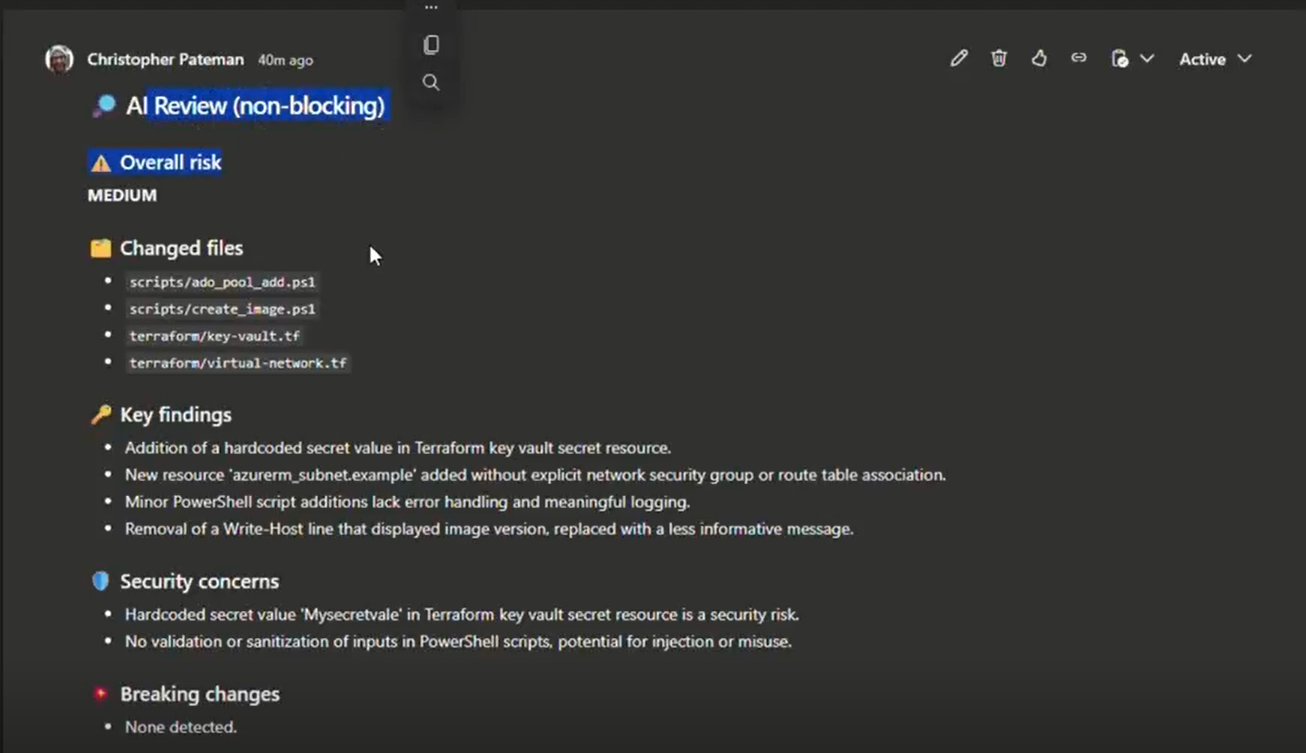
We can then use the output the request to the model can then be used to push the comment to your Pull Request like the below. The output and format will all come down to how you would like to structure it best for your situation.
Applying You Standards
This process is great for general feedback and review on your code based on public models, but you may also want to take into consideration your companies standards. The design of this relies on both an embedding model and the Azure AI Search to create an index of your standards which can be used as a RAG for the context model.
In my version I used another PowerShell script to pull Markdown documentation from repositories containing our coded standards, reusable Azure DevOps templates for context of the whole pipeline and flexibility for word files as well. This process could also be expanded to use things like Document Intelligence to process other documentation into JSON output for reading into the AI Search Index.
Using the embedding first, I created a query to run on the index for finding the most relevant standards.
$prQuery = @"
PR: $($pr.title)
Desc: $($pr.description)
Tags: $((($labels | ForEach-Object { $_.name }) -join ', '))
Changed files: $((($changedPaths) -join ', '))
Focus: enforce coding standards and pipeline templates aligned to changed file types.
"@
The output can then be added to the User payload for context of the company standards to follow.
$userPayload.standards_docs = @()
    foreach ($h in ($hits ?? @())) {
        $userPayload.standards_docs += @{
            source  = ("{0}:{1}" -f $h.repo, $h.path)
            section = $h.section
            excerpt = $h.content
        }
    }
Architecture
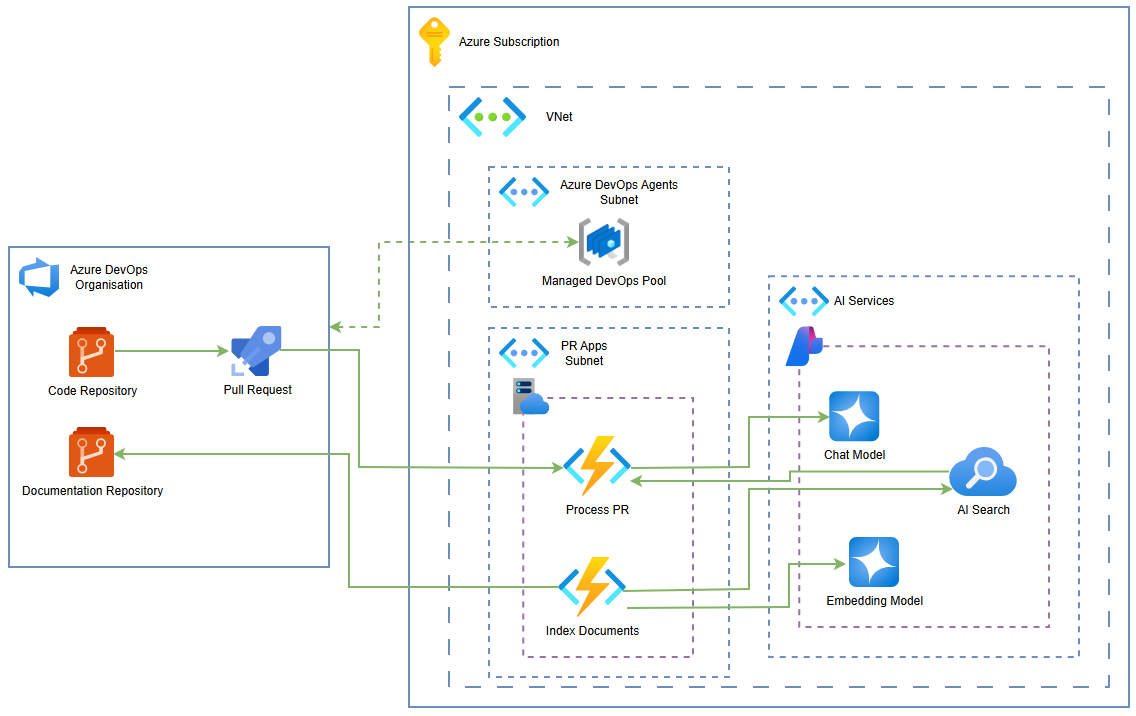
There is no strict design to this as the scripts are agnostic to technology, so it comes down to how you would structure it against your company depending on size, complexity and usage. Below is a suggested design for a simple implementation.
In this we are using the Azure Managed DevOps Pools as the self-hosted agent type. This will create the bridge of secure networking between Azure DevOps and the Azure services.
I have put the scripts in an Azure Function so that we can create it’s own SDLC for developing the code and deploying it in a Blue/Green method. It also has the benefit of being within the Virtual Network for secure connectivity and then being accessible from all systems. For example you could use this same setup for Azure DevOps or other build tools, but all sharing the same logic for AI peer reviewing.
The AI services then used are the AI Foundry for the models and AI Search for the indexes. As mentioned before you might add Azure Document Intelligence if you wanted to process documents into the AI Search.
This design allows:
- secure connectivity
- flexibility with languages used
- scalable consumption
- build/project location agnostic usage
Final Thoughts
This design is very loose and I have provided minimal code as it is very flexible, which is the point of this. You don’t need to conform to a certain style or design, you can build a very fast and simple AI Pull Request Reviewer at a small cost, but have it fit your requirements.
I am a fan of using AI to do reviews, but I am also an engineer that can see through the marketing fluff. The reviewer can find the obvious and give good light suggestions, but will not replace the engineers peer review as the process and impact to give the AI model all the context and experience is not worth the output.
This can be take further to help assist particular development processes like small changes that need less attention or additional automation triggered from outputs.
 PR Code