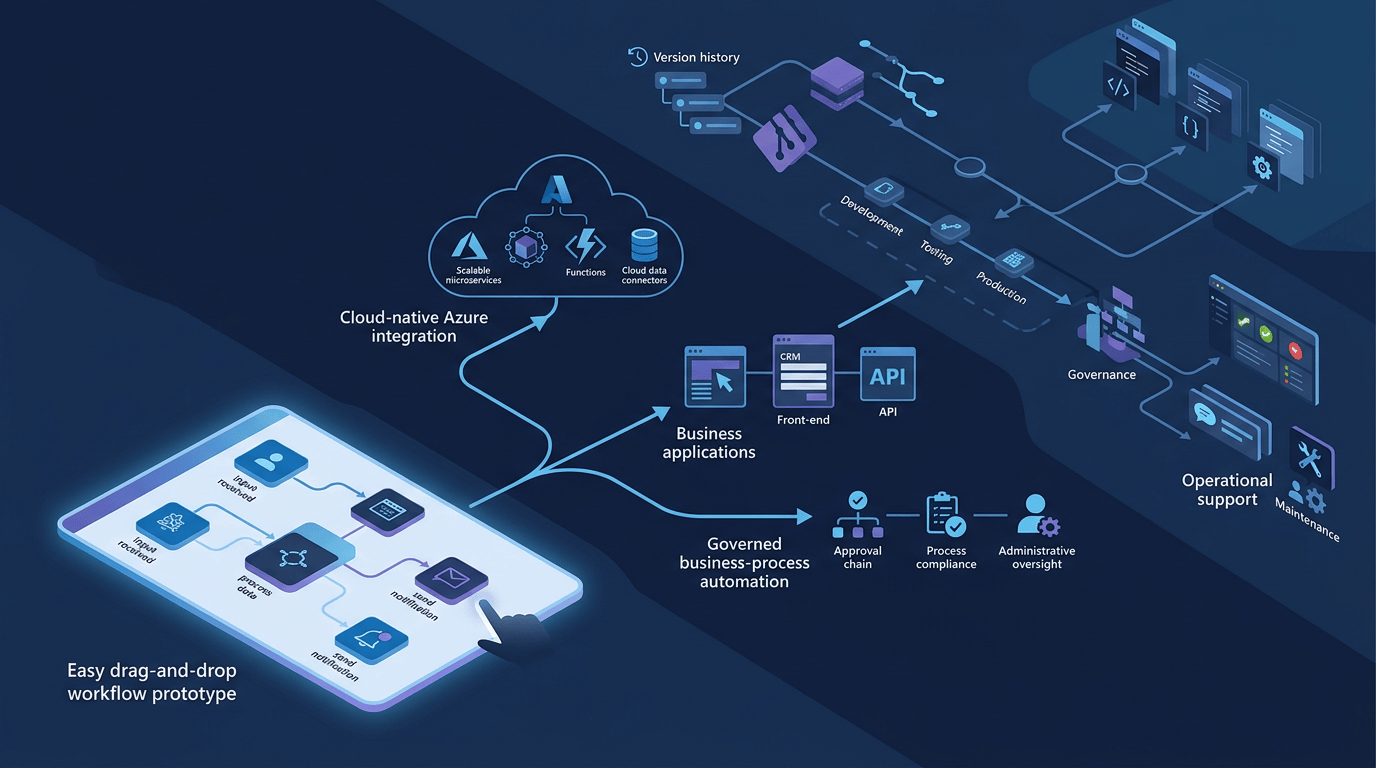
I keep seeing the same technology decision being made for the same reason. Someone needs to send an email, connect to Microsoft 365 or automate a process in Azure. They search for an answer, Logic Apps appears, the designer looks simple enough and the connectors are already there. An hour later, they have something working and Logic Apps feels like the obvious choice.
There is nothing wrong with that. I use a Logic App in one of my own sandbox management platforms because it fits the job. It runs in a single environment, does not need a full Continuous Integration and Continuous Delivery (CI/CD) process, and gives me the Microsoft 365 connectivity I need without building another application. The problem starts when the same decision is carried into a production service without anyone stopping to ask how the workflow will be versioned, tested, promoted, governed, supported and changed. Add several developers and multiple environments—Development, Test, User Acceptance Testing (UAT) and Production—and suddenly the quick workflow has a much bigger delivery problem around it.
This is not another feature comparison. It is about choosing the tool that still makes sense after the first successful run, when the Software Development Life Cycle (SDLC) becomes part of the requirement.
Logic Apps: Easy to Build, Harder to Productise
Logic Apps is usually where this conversation starts, and for good reason. It is very good at the job it was designed to do.
If I need to connect Azure services, orchestrate Application Programming Interfaces (APIs), react to an event or automate a cloud-native workflow, I can get moving quickly. That fast feedback is useful. It can also hide how much engineering is still waiting once the workflow needs to leave the designer and become a supported service.
So, I try not to stop at, ‘Can I build this?’ The better question is, ‘Can the team deliver it, change it and operate it safely for as long as it exists?’
I have seen plenty of workflows behave perfectly in Development before the team realises they now need all the controls expected of any other production service:
- Source control
- Environment promotion
- Parameterisation
- Automated deployment
- Release management
- Repeatable builds
That is normally the point where the designer stops being the interesting bit. Now the team must extract deployable definitions, manage connections and secrets, separate environment configuration, validate changes and create a reliable path through Development, Test, UAT and Production.
Can it be done? Absolutely. Do I enjoy doing it? Not particularly.
The first build was easy. The fiftieth change is where the original platform choice gets tested.
My rule for Logic Apps
Logic Apps are often a strong choice when the workflow meets these criteria:
- Lives primarily inside Azure
- Has limited governance requirements
- Single environment hosting
- Will not be replicated repeatedly across customers or environments
If you already know the solution needs release pipelines, repeatable packaging and promotion across environments, do not leave those decisions until later. They are part of the architecture from day one, and they may be the reason to choose something else.
Power Apps: Excellent for Solving Problems Close to the User
Power Apps has saved organisations a huge amount of time and money. I have seen teams replace spreadsheets, email chains, manual approvals and paper processes in days rather than months.
That is exactly what Power Apps was built for.
Where teams get caught out is assuming that because Power Apps can create an application quickly, it should become the default platform for every application. A local business solution and a reusable enterprise product are not the same thing. They have different owners, different support models and very different expectations around change.
Power Apps works brilliantly when someone close to a process says, ‘This is painful and I need a better way to do it.’ It becomes a different conversation when the requirement is, ‘We need to package, govern and deploy the same solution repeatedly across multiple clients.’
Could you make it work? Of course. But at that point, you are asking the platform to solve a different problem from the one it was optimised for.
My rule for Power Apps
Use Power Apps when these conditions apply:
- Speed matters
- Business ownership is important
- The audience is localised
- The primary goal is productivity improvement
It is a great platform for giving people close to the problem the tools to fix it. I just would not start there if the real requirement were a governed product that needs to be delivered again and again.
Power Automate: The Lifecycle Story Many Teams Miss
This is where things get interesting.
Power Automate is often written off as the workflow tool that comes with Microsoft 365. That is usually based on how people first come across it, not on what happens when the workflow needs to be managed properly.
For business automation that needs some proper engineering around it, Power Automate can sit in a useful middle ground. Solutions, environment variables, connection references, managed environments and deployment pipelines give you an Application Lifecycle Management (ALM) model that can be designed in from the start instead of added after the workflow has become important.
It still needs engineering discipline. The difference is that the route from build to controlled promotion across environments is easier to make part of the solution rather than a separate problem around it.
That matters in consulting because most clients do not care which automation badge sits underneath the process. They care whether the solution can be governed, supported, audited, deployed again and understood by the team that inherits it six months later.
Against that test, Power Automate often does better than people expect.
A Real-World Consulting Scenario
Take an ordinary approval or operational workflow that needs to pass through several environments under formal change control. Getting the process to run is only a small part of the job. The team also needs controlled configuration, traceable releases, auditable changes, clear support ownership and something that can be handed over without a two-hour explanation.
Logic Apps may still feel like the more ‘enterprise’ answer because it is Azure-native. But if the real requirement is business process automation, environment promotion, connection management and operational governance, Power Automate can be the more sensible fit.
Not because it wins every technical comparison, but because it can be easier to turn into a service that another team can actually operate.
And in enterprise delivery, operationalising a solution is often more important than building it.
The Question I Always Ask
How many times will this be deployed?
Most solutions are designed around getting into the first environment. I want to know what happens on deployment two, ten and fifty.
The first build may take two weeks, but the service could be around for years. Every manual export, environment fix, undocumented connection and nervous production deployment adds cost. A cheap prototype can become a very expensive thing to own.
A Simple Decision Framework
| Requirement | Logic Apps | Power Apps | Power Automate |
| Single environment | Strong | Strong | Strong |
| Personal productivity | Poor fit | Best fit | Good fit |
| Azure-native integration | Best fit | Poor fit | Good fit |
| Business process automation | Good fit | Good fit | Best fit |
| Multiple environments | Possible, but effort | Possible, but effort | Strong |
| Enterprise governance | Possible, but effort | Possible, but effort | Strong |
| CI/CD and repeatable promotion | Possible, but effort | Possible, but effort | Strong |
| Repeatable client delivery | Poor fit | Situational | Best fit |
When to Use What
If you want a quick sense-check before a prototype quietly becomes the production architecture, these are the prompts I use:
Use Logic Apps when:
- The workload is primarily Azure-native.
- You are orchestrating APIs, events, services or infrastructure workflows.
- The solution is closer to integration engineering than business process automation.
- You do not need a heavy application lifecycle management model.
- The workflow is unlikely to be packaged and redeployed repeatedly across many customers or environments.
Use Power Apps when:
- The priority is solving a local business problem quickly.
- The users closest to the process need to own or adapt the solution.
- You are replacing spreadsheets, email chains, forms or manual approvals.
- The solution is focused on productivity rather than reusable product delivery.
- The audience is known, contained and relatively stable.
Use Power Automate when these conditions apply:
- The requirement is business process automation with enterprise controls.
- You need environment variables, connection references, managed environments or solution-aware deployment.
- The workflow needs to pass through Dev, Test, UAT and Production under change control.
- The solution must be supported, audited and handed over cleanly.
- You are designing for repeatability, not just the first successful build.
These are not hard rules. They are prompts to get the important questions on the table early: who owns it, how many environments it needs, how often it changes, how it is governed and who supports it when the original developer has moved on. The answers should drive the platform choice, not appear as problems afterwards.
Final Thoughts
The best automation tool is not always the one at the top of the search results, the one with the quickest designer or the one the engineer already knows. It is the one that fits how the solution will be delivered and run.
Build speed matters, but it is only one part of the cost. Source control, testing, promotion, governance, observability, support and future change matter as well. Ignore them at the start and they do not disappear. They just come back later, when the solution is harder to change and more people depend on it.
That is why I try not to start with the technology. I start with the lifecycle. Who will own it? How many environments does it need? How often will it change? How will it be promoted? What will the support team need when it fails at 2 a.m.?
Once a solution moves into enterprise delivery, building the workflow is often the easy bit. The operating model around it is where the architecture decision really sits. Make that decision at the beginning, not after the prototype has already become critical.
Takeaway: Do not choose an automation platform because the first workflow is quick to build. Work out who owns it, how it moves between environments, how it is governed and how often it will be deployed. Then choose the tool that makes that lifecycle easier.

